
































OpenTelemetry Monitoring
This guide walks through setting up an observability stack that collects telemetry from your spoke clusters using OpenTelemetry, stores it in the storage backends you choose (Thanos with object storage, ClickHouse, VictoriaMetrics, or VictoriaLogs), and exposes it through a TelemetryStack.
Architecture
The setup involves three kinds of clusters:
- Hub cluster — the central Platform Console (ACE). This is where you operate clusters, manage organizations, and view dashboards. It is the management plane; it does not store telemetry itself.
- Monitoring cluster — a dedicated observability cluster that runs the TelemetryStack and stores all telemetry. Metrics go to Thanos (with object storage) or VictoriaMetrics, and logs go to ClickHouse or VictoriaLogs. It serves multi-tenant queries back to the hub. This is the cluster imported with the Observability Cluster profile.
- Spoke / imported clusters — the clusters you actually want to observe.
Once the OpenTelemetry feature (
appscode-otel-stack) is enabled on them, their collectors ship metrics, logs, and traces to the monitoring cluster.
In short: spoke clusters produce telemetry, the monitoring cluster stores and serves it, and the hub is where you view it.
Choosing a Storage Backend
When you create the TelemetryStack you pick one backend for metrics and one for logs. The two choices are independent, but there are two common combinations:
| Thanos + ClickHouse | VictoriaMetrics + VictoriaLogs | |
|---|---|---|
| Metrics | Thanos | VictoriaMetrics |
| Logs | ClickHouse | VictoriaLogs |
| Where data is stored | S3-compatible object storage (MinIO, AWS S3, and so on) | Persistent volumes on the monitoring cluster. No object storage is needed |
| Downsampling | Yes. Metrics keep raw, 5-minute, and 1-hour resolutions, each with its own retention | No. All samples are kept at full resolution for the whole retention period |
| Retention | Metrics: three values (raw, 5m, 1h). Logs: one value | Metrics: one value. Logs: one value |
| Operator | thanos-operator | victoria-metrics-operator |
| Deployment mode | Per component | Standalone (single node) or Cluster |
Choose Thanos + ClickHouse when you need long retention at low cost, because downsampling and object storage keep old data cheap. Choose VictoriaMetrics + VictoriaLogs for a simpler setup with no object storage, when full-resolution data on local disks is enough.
Everything else in this guide is the same for both: the tenant-operator,
prom-label-proxy, and the OpenTelemetry collectors on the spoke clusters work
the same way, and a client organization is created the same way.
The Monitoring Cluster’s Special Features
Beyond a normal spoke, the monitoring cluster runs three components (in the
monitoring namespace) that make multi-tenant telemetry storage work:
thanos-operator— reconciles the Thanos custom resources (ThanosReceive,ThanosStore,ThanosQuery,ThanosCompact,ThanosRuler) that the TelemetryStack generates into running workloads. It is the controller that turns your TelemetryStack spec into an actual Thanos deployment. Used for the Thanos backend.victoria-metrics-operator- reconciles the VictoriaMetrics custom resources (VMSingleorVMClusterfor metrics,VLSingleorVLClusterfor logs) that the TelemetryStack generates. Used for the VictoriaMetrics and VictoriaLogs backends. Enable the VictoriaMetrics Operator feature before you create the TelemetryStack, because the stack’s resources need its CRDs.tenant-operator— managesTenantcustom resources. Each client organization / monitored cluster gets aTenantthat references the TelemetryStack and defines its retention and ingest/query endpoints, giving every tenant an isolated slice of the shared stack.prom-label-proxy— the multi-tenant gateway on the ingest and query paths. It enforces per-tenant label filtering (via the tenant ID / label) so each tenant can only write to and read back its own data. TheTenantendpoints point at this proxy.
Overview
The end-to-end flow is:
- Create a self-hosted installer.
- Create the observability cluster.
- Install MinIO (only for Thanos and ClickHouse).
- Create the
telemetrybucket (only for Thanos and ClickHouse). - Create a TelemetryStack.
- Enable OpenTelemetry on the spoke clusters to be monitored.
- Create a client organization.
Step 1: Create the Self-Hosted Installer
Set up a self-hosted installer for your environment.
Step 2: Create the Observability Cluster
Create a new cluster and import it as a spoke, choosing the Observability Cluster cluster profile during import. See Import Observability Cluster for details.
Step 3: Install MinIO
VictoriaMetrics and VictoriaLogs do not need object storage. If you use them for both metrics and logs, skip steps 3 and 4 and go to Step 5.
The TelemetryStack can be backed by any S3-compatible object storage — MinIO is used here only as an example. Substitute your own storage solution (AWS S3, GCS, Ceph, etc.) as needed.
Install MinIO on the observability cluster to provide the object storage that backs the TelemetryStack:
kubectl create ns minio

kubectl create secret generic tls-ssl-minio -n minio \
  --from-file=private.key \
  --from-file=public.crt

kubectl create secret generic tls-ssl-minio -n monitoring \
  --from-file=private.key \
  --from-file=public.crt

helm repo add minio-comm https://charts.min.io/

helm upgrade -i minio \
  --namespace minio \
  --create-namespace \
  --set rootUser=rootuser,rootPassword=rootpass123 \
  minio-comm/minio \
  -f ./minio/minio-values.yaml
The tls-ssl-minio secret is created in both the minio and monitoring
namespaces so that MinIO and the telemetry components can serve and consume TLS
using the same certificate pair (private.key / public.crt).
Step 4: Create the telemetry Bucket
Port-forward the MinIO console and create the bucket through the UI:
kubectl port-forward -n minio svc/minio-console 9001:9001
Open https://localhost:9001 and log in:
| Field | Value |
|---|---|
| Username | rootuser |
| Password | rootpass123 |
Create a bucket named telemetry.
Step 5: Create a TelemetryStack
In the observability cluster, navigate to:
Settings → TelemetryStack → Create a new Telemetry stack
The first page, Backends, lets you choose where telemetry is stored:
- Metrics -
ThanosorVictoriaMetrics. - Logs -
ClickHouseorVictoriaLogs.
The other pages in the sidebar change to match your choice. Fill in the sections for the backends you picked.
Thanos and ClickHouse
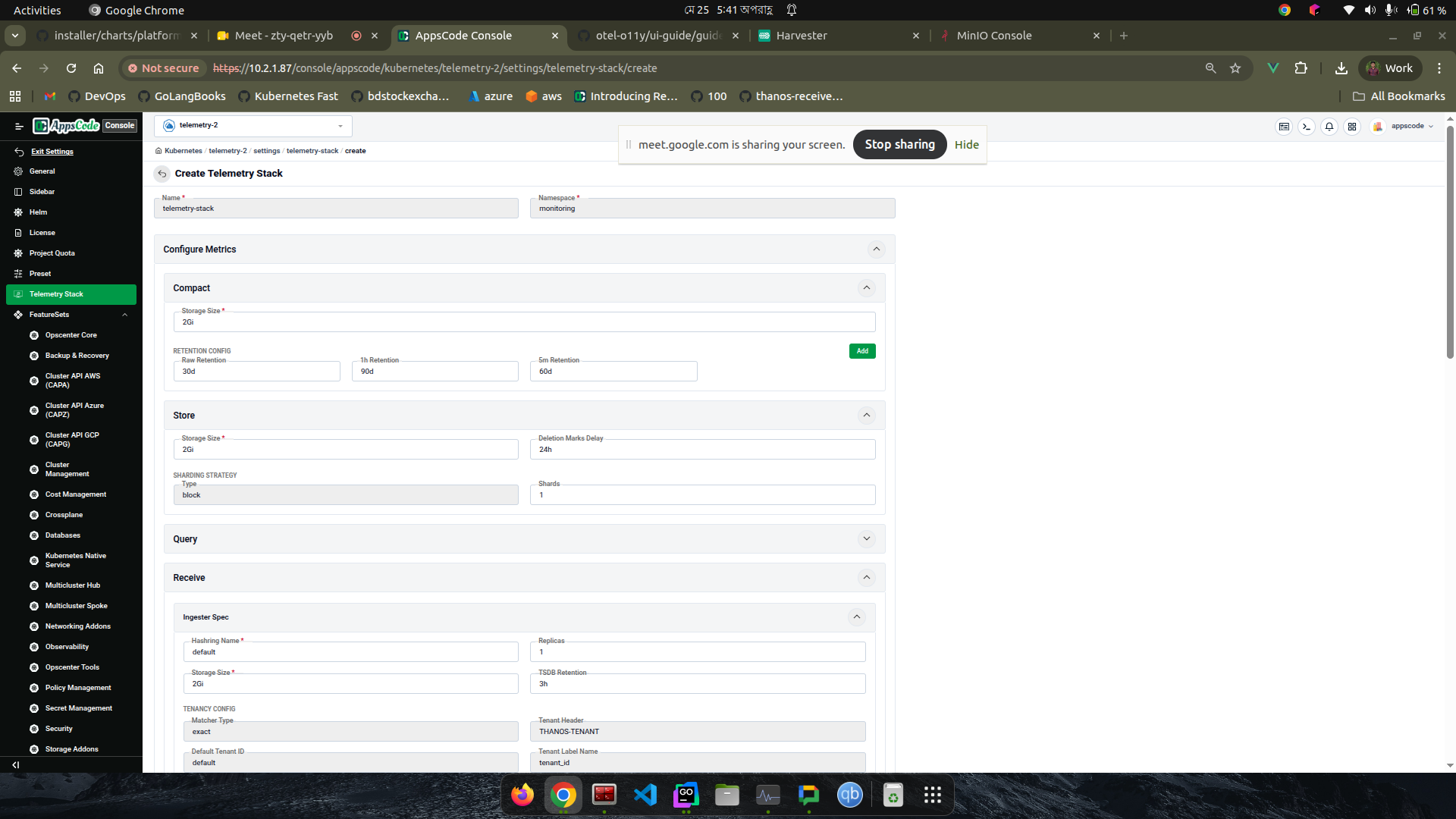
Configure Metrics (Compact, Store, Query, Router, Ingester):
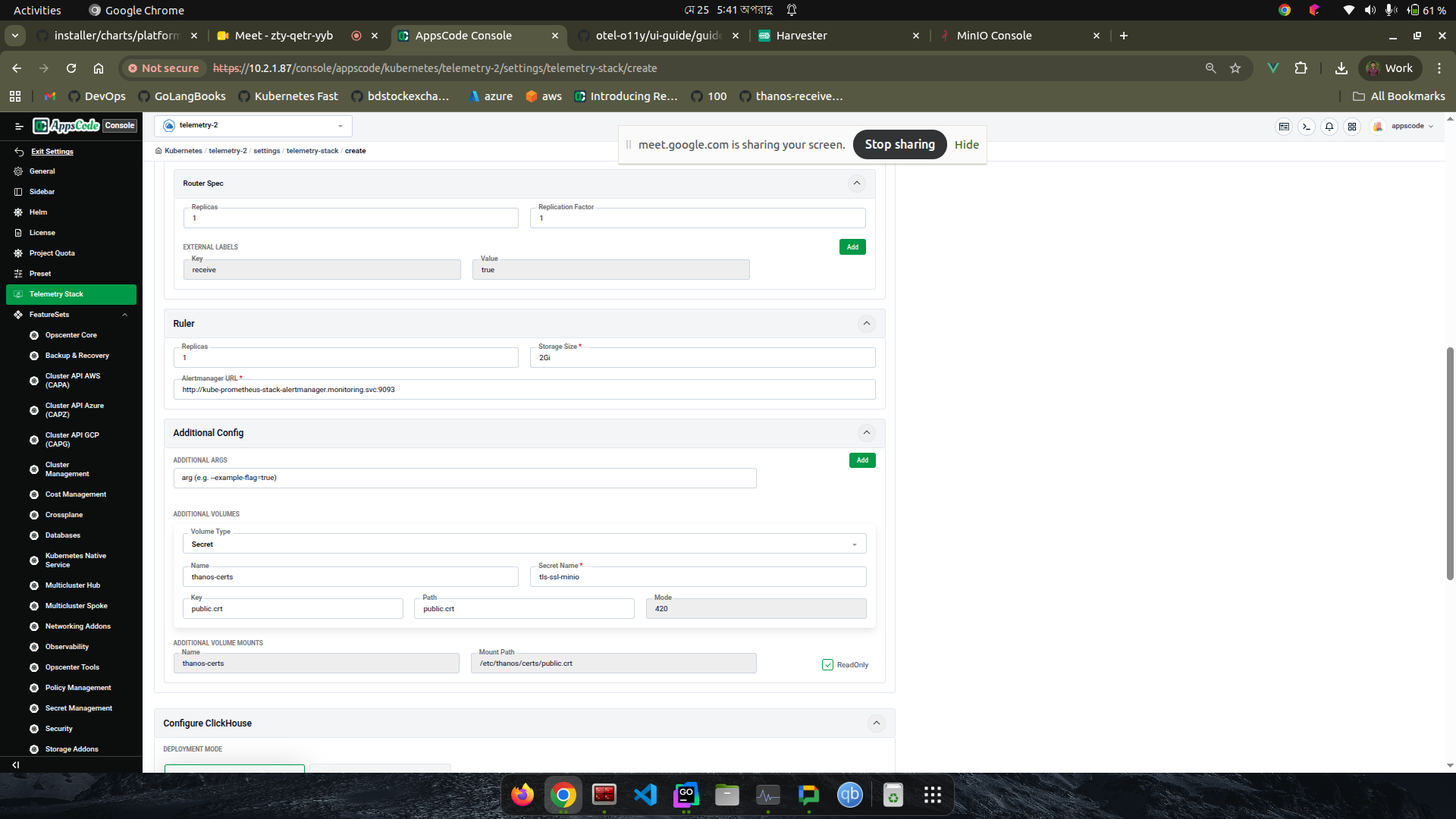
Ruler, Additional Config, and Configure Clickhouse:
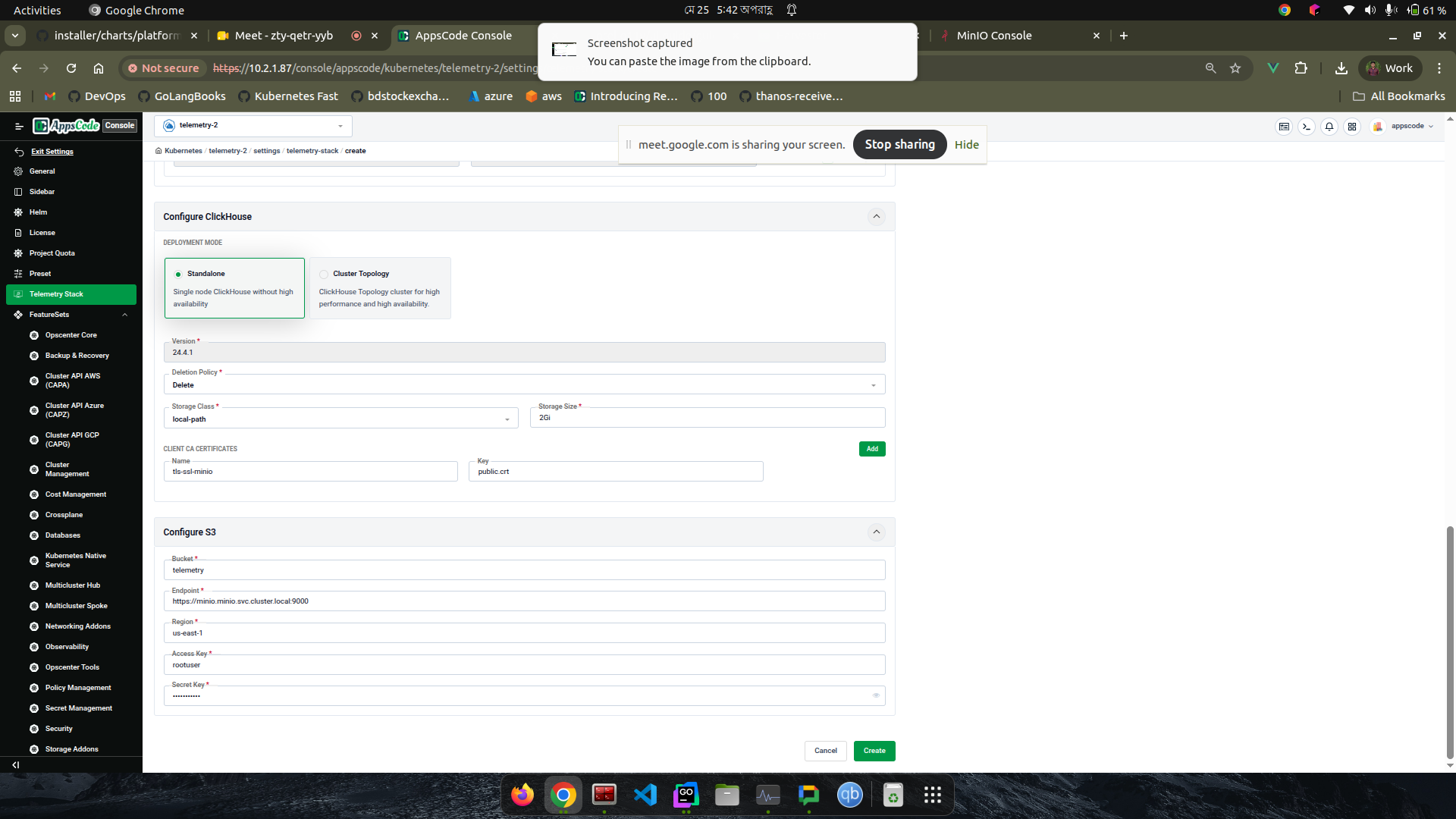
Configure Clickhouse (Standalone / Create Topology), Configure S3, and Configure ID:
VictoriaMetrics and VictoriaLogs
If you chose VictoriaMetrics or VictoriaLogs, the sidebar shows a page for each. There is no S3 page, because both store data on persistent volumes.
VictoriaMetrics (metrics)
| Field | Description |
|---|---|
| Deployment Mode | Standalone runs one pod for write, read, and storage. Cluster runs separate insert, select, and storage components for scale-out. |
| Default Retention | Retention for tenants that do not set their own. Default 30d. |
| Retention Strategy | PerTierInstance (default) runs one instance for each distinct retention. RetentionFilters runs one merged instance with a retention per tenant, and needs a VictoriaMetrics Enterprise licence. |
| Licence Secret, Licence Secret Key | Optional. The Secret and key that hold the Enterprise licence. |
| Storage Size, Storage Class | The persistent volume for each instance. Size it for the longest retention at full resolution. |
| Replication Factor, Insert / Select / Storage Replicas | Cluster mode only. How many copies of each sample are kept, and how many replicas each component runs. |
VictoriaLogs (logs)
| Field | Description |
|---|---|
| Deployment Mode | Standalone or Cluster, as above. |
| Default Retention | Retention for tenants that do not set their own. Default 30d. |
| Future Retention | Log entries timestamped further ahead than this are rejected. Default 2d. |
| Max Disk Usage % | When the disk passes this percentage, the oldest data is dropped, whatever the retention. |
| Storage Size, Storage Class | The persistent volume for each instance. |
| Insert / Select / Storage Replicas | Cluster mode only. |
Resources Created by the TelemetryStack
Once the TelemetryStack is created, the operators reconcile it into a set of
resources in the monitoring namespace. You can find everything the stack owns
by looking for resources whose owner is the TelemetryStack:
# The Thanos and ClickHouse custom resources generated from the stack
kubectl get thanosreceives,thanosstores,thanosqueries,thanoscompacts,thanosrulers.monitoring.thanos.io,clickhouse -n monitoring

# Any resource owned by the telemetry-stack (children carry it in ownerReferences)
kubectl get all -n monitoring -o json | \
  jq -r '.items[] | select(.metadata.ownerReferences[]?.kind=="TelemetryStack") | "\(.kind)/\(.metadata.name)"'
For the metrics pipeline, thanos-operator produces:
ThanosReceive→ a receive-router deployment plus a receive-ingester StatefulSet — the remote-write ingestion endpoint for incoming metrics.ThanosStore→ a store StatefulSet that serves historical blocks from object storage.ThanosQuery→ query and query-frontend deployments that fan out reads across the receivers and store.ThanosCompact→ one StatefulSet per retention tier that downsamples and compacts blocks in object storage.ThanosRuler→ a ruler StatefulSet that evaluates recording/alerting rules and forwards alerts to Alertmanager.
For the logs / traces pipeline, a KubeDB ClickHouse database
(telemetry-stack-clickhouse) is provisioned, along with the supporting
secrets (telemetry-stack-object-storage,
telemetry-stack-clickhouse-storage-config).
For the VictoriaMetrics and VictoriaLogs backends, victoria-metrics-operator
produces:
VMSingle(Standalone) orVMCluster(Cluster) - stores metrics.VLSingle(Standalone) orVLCluster(Cluster) - stores logs.
Instances are named telemetry-stack-vm-<retention> and
telemetry-stack-vl-<retention>, for example telemetry-stack-vm-1y. List them
with:
kubectl get vmsingle,vlsingle,vmcluster,vlcluster -n monitoring
An instance shows operational when it is ready.
Retention with VictoriaMetrics and VictoriaLogs
Without a licence, VictoriaMetrics and VictoriaLogs support only one retention
for each instance. The tenant-operator handles this by running one
instance for each distinct retention and sending each tenant to the instance
that matches its retention:
- Tenants with the same retention share one instance. They are kept apart by an account ID, so one tenant never reads another tenant’s data.
- A tenant with a new retention value gets a new instance, with its own volume.
- Instances that no tenant uses any more are removed.
Metrics need one value only. VictoriaMetrics has no downsampling, so the raw, 5-minute, and 1-hour retention fields of a Thanos stack do not apply. When a client organization is created on a VictoriaMetrics stack, one metrics retention is used and all samples are kept at full resolution for that period. See Create a Client Organization.
With a VictoriaMetrics Enterprise licence and the RetentionFilters strategy,
all tenants share a single metrics instance and each tenant keeps its own
retention. VictoriaLogs always uses one instance for each retention.
Step 6: Enable OpenTelemetry on a Spoke Cluster
Enable the OpenTelemetry feature on each spoke cluster you want to monitor — either during import or on an existing spoke. See Import Observability Cluster.
Step 7: Create a Client Organization
Create a client organization and point it at the monitoring cluster so its telemetry is stored in the shared TelemetryStack. See Create a Client Organization — the Telemetry Configuration step is where you select the monitoring cluster and set retention.